Image tutorial
AI Head Swap vs Face Swap: What Changes in Two Photo Tests?
We tried Face Swap, Pro and Head Swap on two photos using one reference portrait. Compare the results, facial close-ups, output sizes and credit costs.
On this page
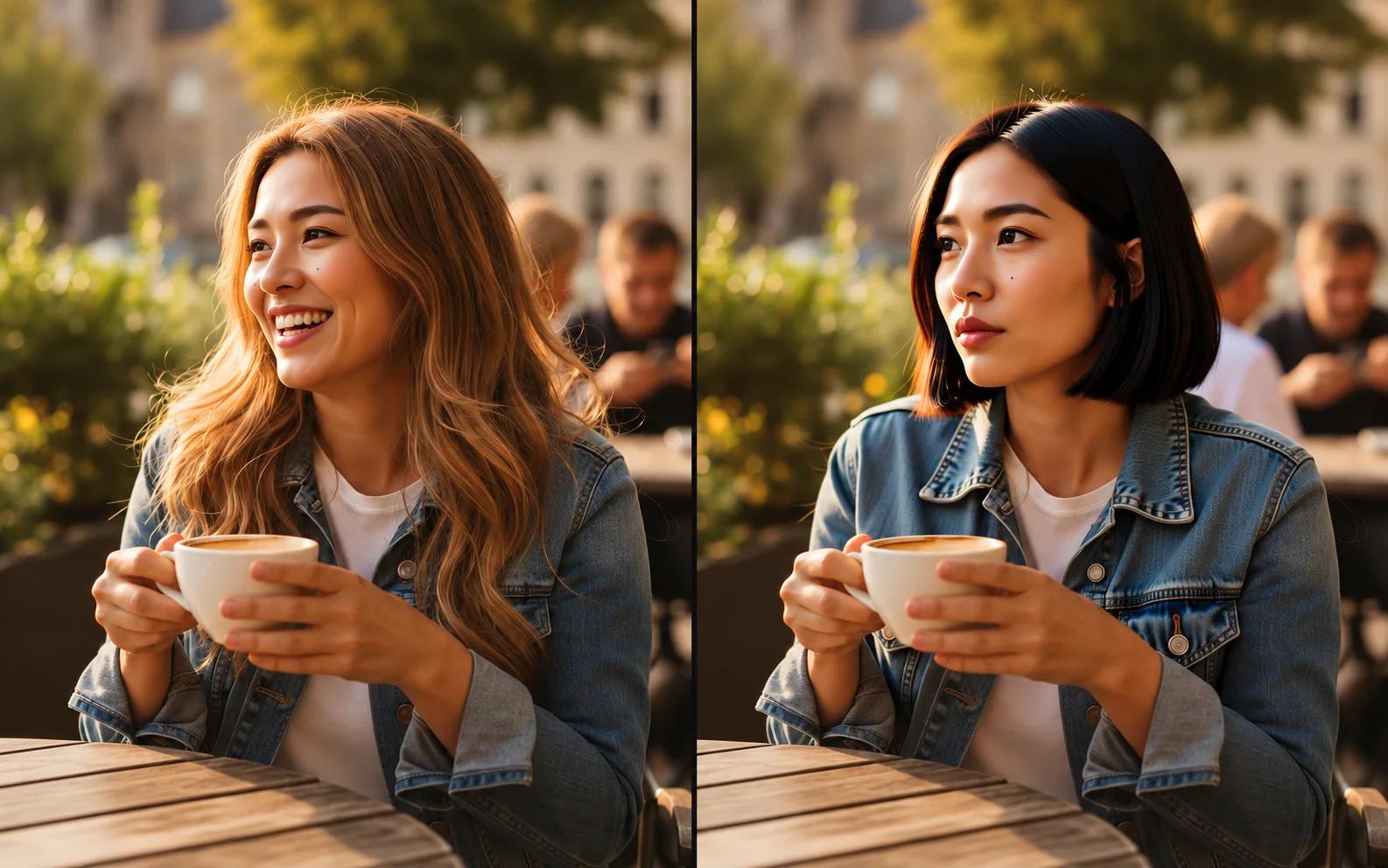
Any face changer, including a basic face swap, can alter someone's features without making the photo look like a different person. That was our first impression of the café portrait below: the eyes and nose had changed, but the hair, warm lighting and familiar outline still dominated the picture.
To see where each approach helps, we tested the three modes in our face swap tool: Face Swap, Face Swap Pro and Head Swap. These tests were run on October 21, 2026, using two target photos and the same reference headshot for both. Everyone pictured is AI-generated. The examples show what happened with these particular inputs; face angle, obstructions and image quality can all affect another photo's results.
What each mode replaces
| Mode | Main area changed | What it largely retains | Credits |
|---|---|---|---|
| Face Swap | Facial features and contours | Hair; skin tone and texture also stayed closer to the target in our tests | 3 |
| Face Swap Pro | More of the face, including skin tone, brows and details such as moles | Hair, hats and the overall body and background composition | 6 |
| Head Swap | Face, hair and the head's outline | Overall body and background composition | 6 |
Basic Face Swap is the most conservative face changer of the three, making a local change. Pro redraws more facial detail, but recognizable features of the original person may remain. An AI head swap replaces a larger area, including the hairstyle. That extra freedom can also change the expression or parts of the neck and collar, as the first example shows.
Test one: a café portrait and a studio headshot
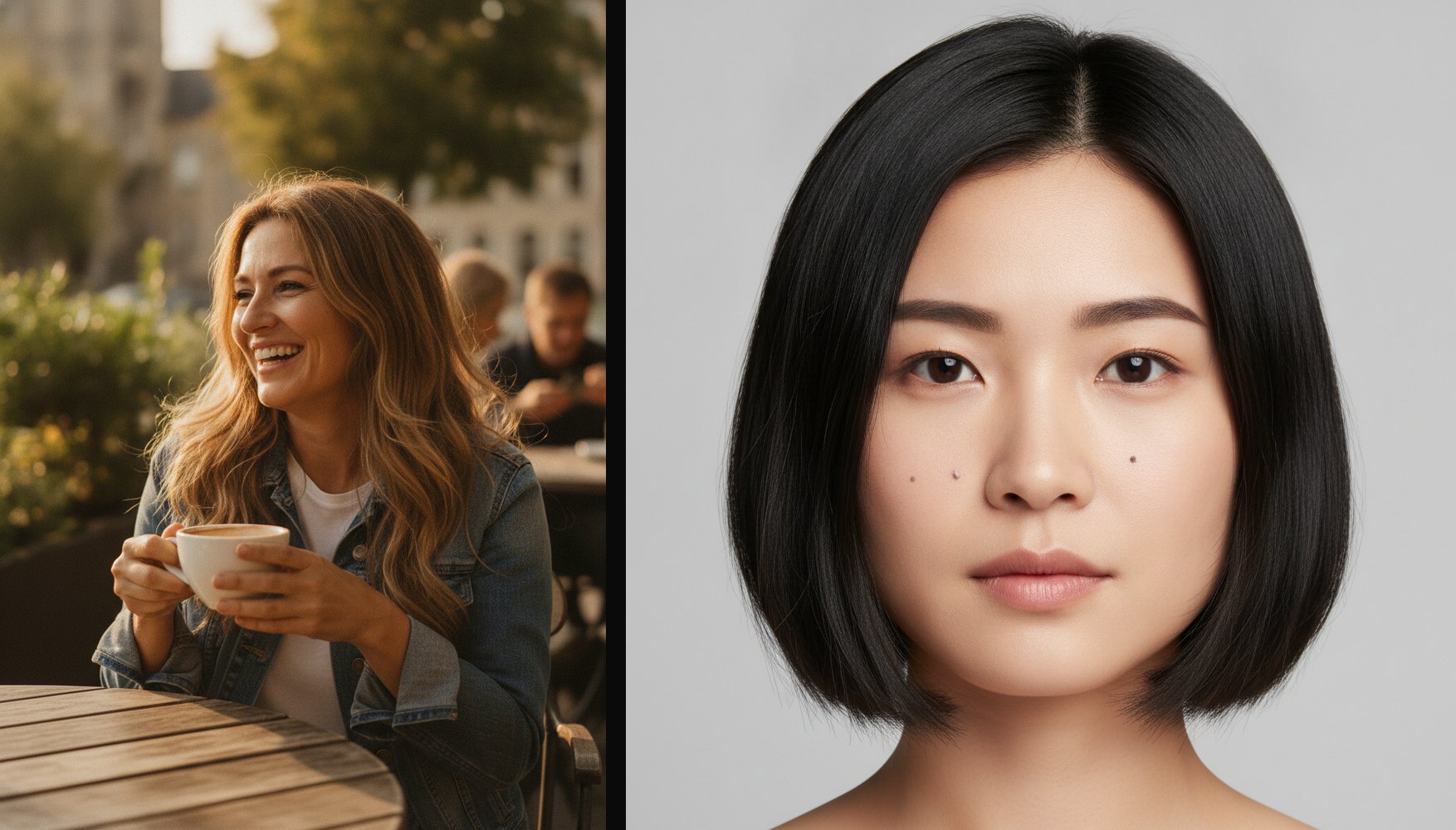
Our target photo shows a woman laughing over coffee, with long hair and warm sunlight from behind. The reference is a studio portrait of another woman with a dark bob and small moles on her cheeks.
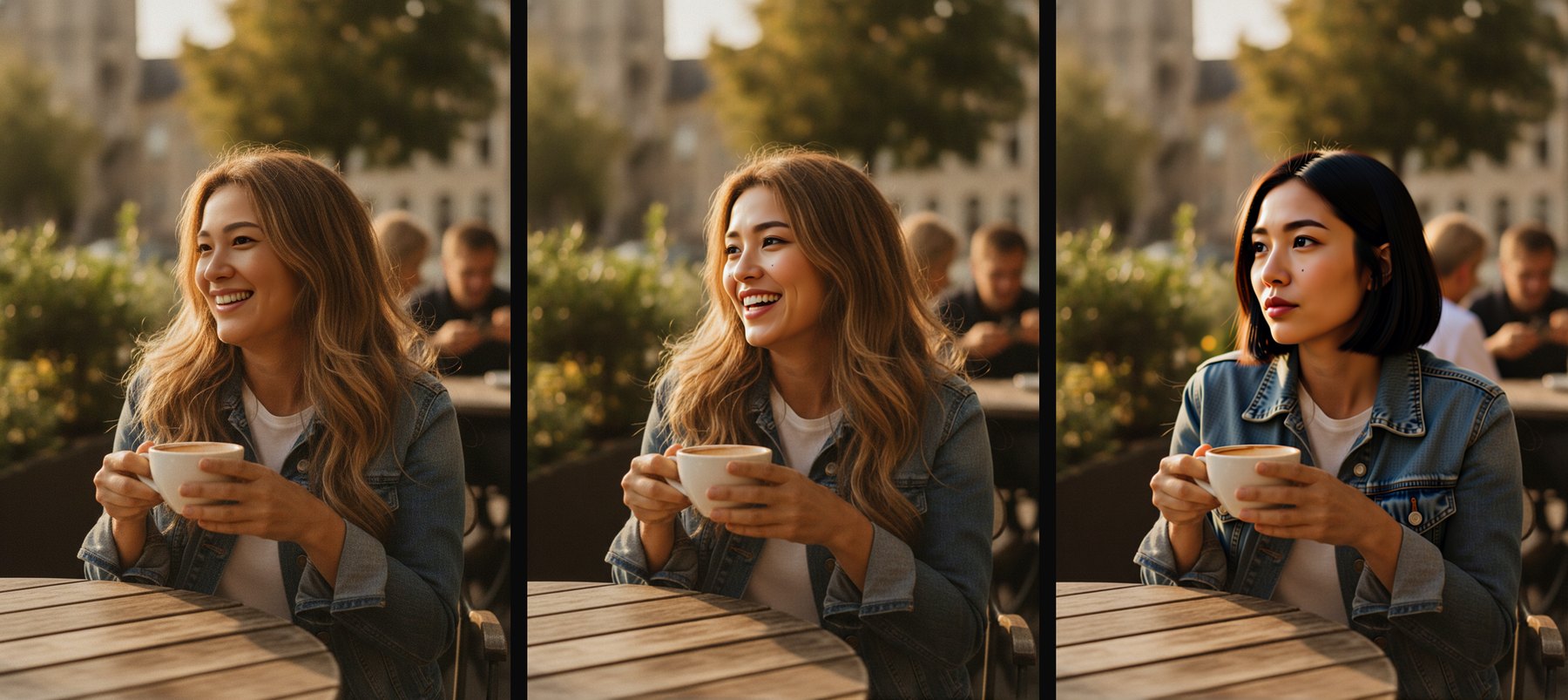
Left to right: Face Swap, Face Swap Pro, Head Swap.
The basic result is subtle at this scale. The eyes, nose and mouth have changed, but the long hair and warm colouring keep it visually close to the target photo. Pro carries over more detail from the reference, particularly around the eyebrows and cheeks, while leaving the long hairstyle in place.
Head Swap makes the most obvious change: the dark bob replaces the long hair. It also replaces the laugh with a closed-mouth expression and alters the neckline and jacket collar. If the original smile is the reason you like the photo, that is a meaningful trade-off.
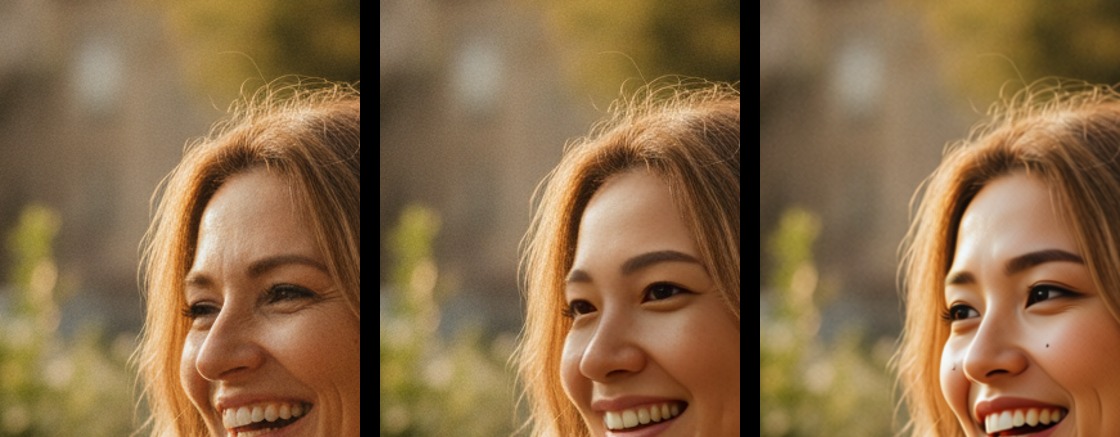
The close-up compares the original, basic and Pro versions. Basic stays closer to the target's skin tone and texture. Pro changes the brow more noticeably and adds a mole below the eye, carrying over more of the reference face's detail in this example.
Test two: a beard and a wool hat complicate the swap
The second target is an older man wearing a knitted hat and a green sweater, leaning over a boat on a pebble beach. We used the same studio headshot as the reference.
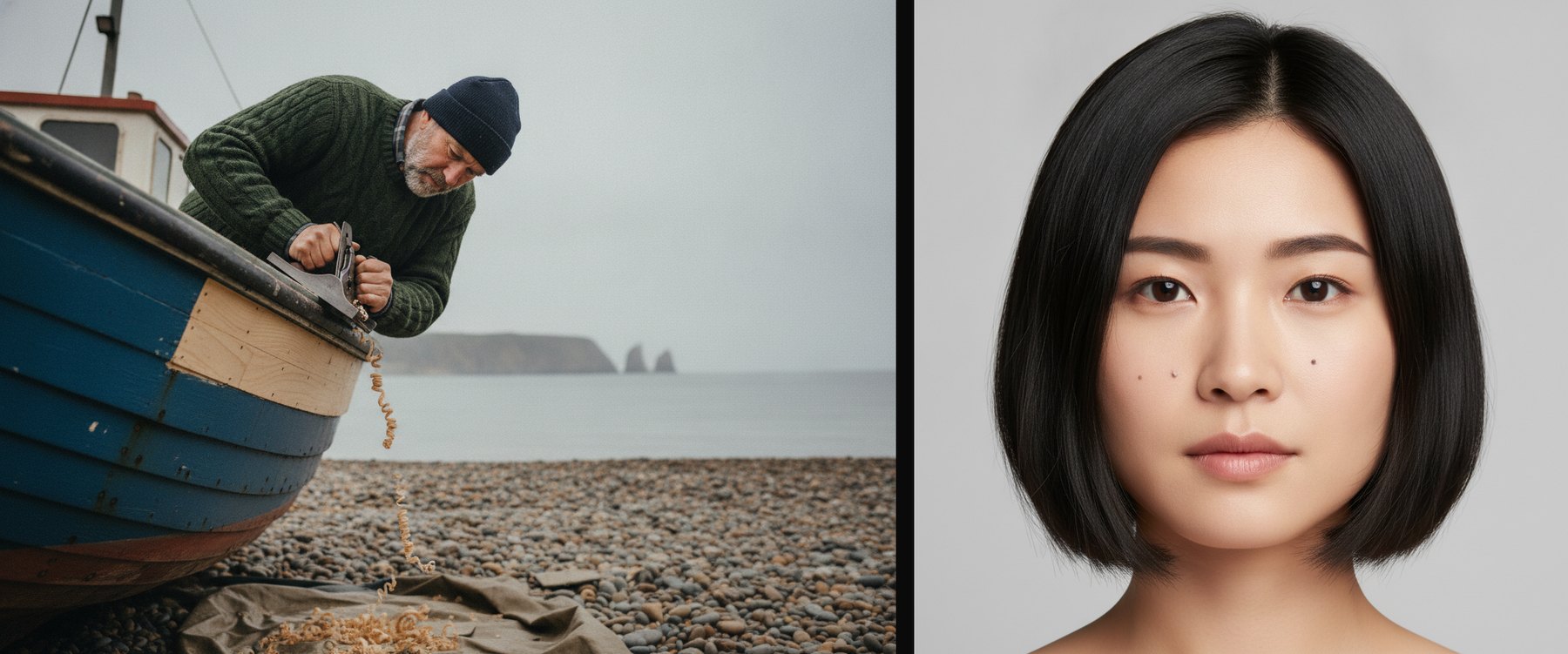
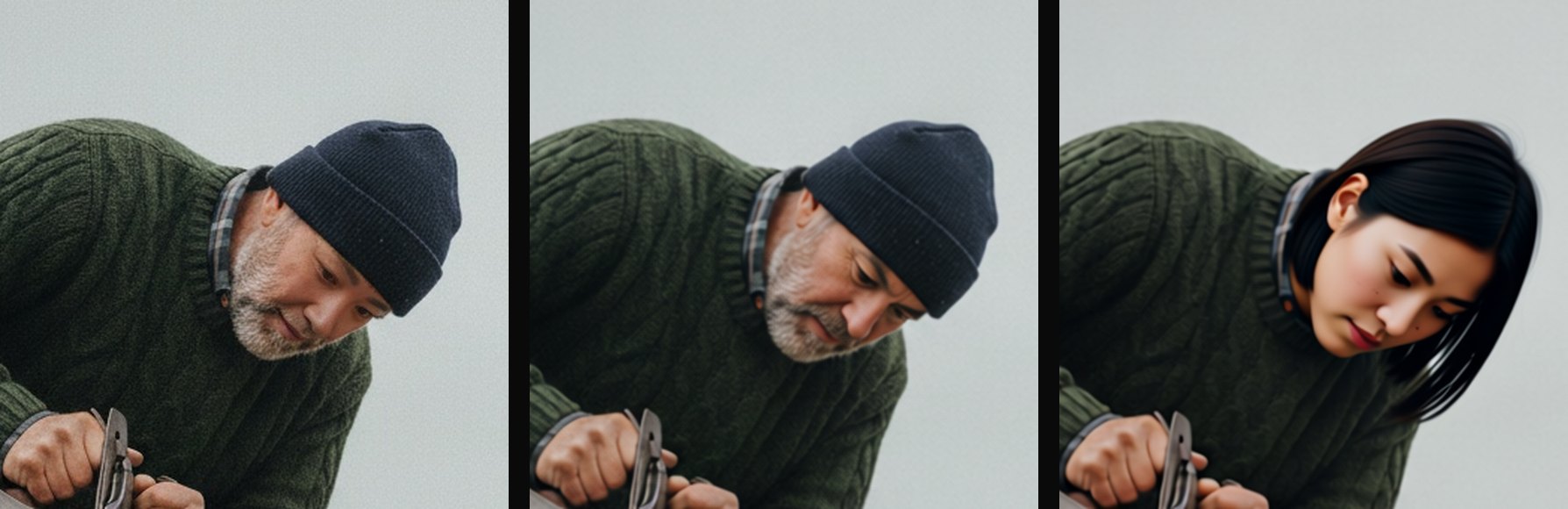
Again, the order is Face Swap, Pro, Head Swap. The basic version shows little visible change: the grey beard and weathered skin remain prominent. Pro changes more around the eyes, nose and cheeks, but retains the beard too. The overall impression is still of an older man in a wool hat.
The AI head swap removes the hat and beard and brings in the reference woman's face and bob. Of these three results, it gives the clearest resemblance to the reference. This is also why Pro is not a guaranteed fix for a weak likeness: facial hair and other features surrounding the face can still outweigh the changes it makes.
Choose based on what you want to keep
- Start with Face Swap for a more local edit that largely preserves the target's look and keeps its pixel dimensions. At 3 credits, it is the least expensive way to see whether changing the facial features is enough.
- Try Pro when you want to swap faces with AI but keep the hairstyle, bringing across more facial detail such as brows, skin tone or moles. It improved the resemblance in our café example, but did not solve the beard problem in the second test.
- Use Head Swap when the hairstyle needs to change too, or when a beard or hat keeps the result looking like the original person. Check the expression, neck and collar as well as the likeness.
Pro and Head Swap both cost 6 credits. The useful distinction is how much of the person you want replaced. You can choose either mode in the face swap tool after uploading your two photos.
Give it a clear reference face
Whichever mode you use to swap faces with AI, give it a sharp, unobstructed headshot with the face large in the frame. In a separate basic-mode trial, we used a full-length street photo as the reference. The job completed without an error, but the output looked almost unchanged. A completed job does not necessarily mean a convincing swap.
If your reference is a wide shot, the image cropper can help isolate the face you want. Cropping cannot recover detail that was never captured, though. If the eyes and nose are already blurry, a clearer source photo will help more than a tighter crop.
Output sizes and credit costs
| Target dimensions | Face Swap | Face Swap Pro | Head Swap |
|---|---|---|---|
| 864 × 1184 | 864 × 1184 | 872 × 1192 | 872 × 1192 |
| 941 × 1672 | 941 × 1672 | 768 × 1360 | 768 × 1360 |
| Credits per image | 3 | 6 | 6 |
These are the actual output dimensions from the two tests. Basic preserved the input dimensions. Pro and Head Swap returned roughly one-megapixel images, so keep output resolution in mind if you are starting with a large phone photo. Failed jobs are not charged.
Before uploading
Use photos you own or have permission to use. Anyone depicted must be a consenting adult and must not be a public figure. The tool asks you to confirm this before each swap. Results are saved to your account and are not listed in the public gallery.
- Head swap
- Face swap
- Face changer
- AI photo tools
Put your next idea into a picture.
Open the image generator with your own prompt, or choose an example to start exploring.
Open image generator